Features Screenshots Support
📁  Native macOS SQLite Client

SQLite Gnome

Your SQLite files,
finally understood

A fast, native macOS app for opening .db files, browsing tables, running queries, and editing rows — no server required.

Opens instantly. Works offline. Stays out of your way.

macOS 14+·14-day free trial·One-time purchase

A file is not a backup until you've opened it somewhere else. WAL mode: fast, friendly, and still scary at 3am. STRICT tables keep the chaos where it belongs — outside. WITHOUT ROWID is an opinion. A well-reasoned one. If it lives in a .db file, it deserves a proper editor. NULL in SQLite is still not false. It is still chaos with paperwork. A primary key is just a gnome with a clipboard. Embedded databases outlive the apps that made them. Foreign keys are off by default. That's a feature and a warning. Pragma first. Heroics later. The best SQLite client is the one that opens the file. A slow query is just a missing index with good PR. VACUUM is cheaper than explaining fragmentation to your boss. One .db file beats seven sync jobs. Schema should age like oak, not like a CSV someone emailed twice. Read-only mode: for when you trust yourself slightly less than usual. A file is not a backup until you've opened it somewhere else. WAL mode: fast, friendly, and still scary at 3am. STRICT tables keep the chaos where it belongs — outside. WITHOUT ROWID is an opinion. A well-reasoned one. If it lives in a .db file, it deserves a proper editor. NULL in SQLite is still not false. It is still chaos with paperwork. A primary key is just a gnome with a clipboard. Embedded databases outlive the apps that made them. Foreign keys are off by default. That's a feature and a warning. Pragma first. Heroics later. The best SQLite client is the one that opens the file. A slow query is just a missing index with good PR. VACUUM is cheaper than explaining fragmentation to your boss. One .db file beats seven sync jobs. Schema should age like oak, not like a CSV someone emailed twice. Read-only mode: for when you trust yourself slightly less than usual.
Why SQLite Gnome

Built for the work you
actually do every day

No bloat. No Electron. No server. Just a sharp, native tool for the SQLite files already on your machine.

📂
Open Any SQLite File
Open .db, .sqlite, and related formats in seconds. Create new databases from scratch. Save file shortcuts and organize them into sidebar groups.
📋
Table Content View
Browse with paging and sorting. Filter rows with a proper filter builder. Insert, edit, and delete rows. Copy as JSON or INSERT statements.
Query Workspace
Write and run ad hoc SQL with autocomplete. Multiple tabs, saved queries, query history, and multi-statement script support built in.
🏗️
Structure Editor
Inspect columns, indexes, foreign keys, triggers, and views. Add and remove columns when SQLite allows it. One-click CREATE TABLE SQL.
📦
Import & Export
Import CSV data into existing tables. Import SQL files directly through SQLite. Export schema and selected objects as SQLite-compatible SQL.
🛡️
Production Safeguards
Destructive queries get a preflight check. Open files read-only when you want. Automatic backup before risky write operations. WAL sidecar detection built in.

SQLite Gnome does less — on purpose.
Local files. Local speed. No drama.

Not for
  • Server database work
    No host, port, username, or password. No SSH tunnels, no remote connections. That's SQL Gnome's territory.
  • Multi-engine environments
    If you're juggling Postgres, MySQL, and SQLite across 12 environments, you need something heavier.
  • Cloud-integrated dashboards
    No Slack bots. No AI copilot rewriting your queries. No sync services you didn't ask for.
Built for
  • Developers with .db files on their machine
    iOS devs, Electron app makers, Rails devs in development mode — anyone with a local SQLite file that needs a real editor.
  • Mac users who hate Electron
    Native SwiftUI. Launches instantly, scrolls smoothly, respects your battery. Feels like it belongs on macOS.
  • Solo devs and small teams
    One-time purchase. No seats, no subscriptions, no pricing tiers to argue about. Yours forever.

Every view, polished

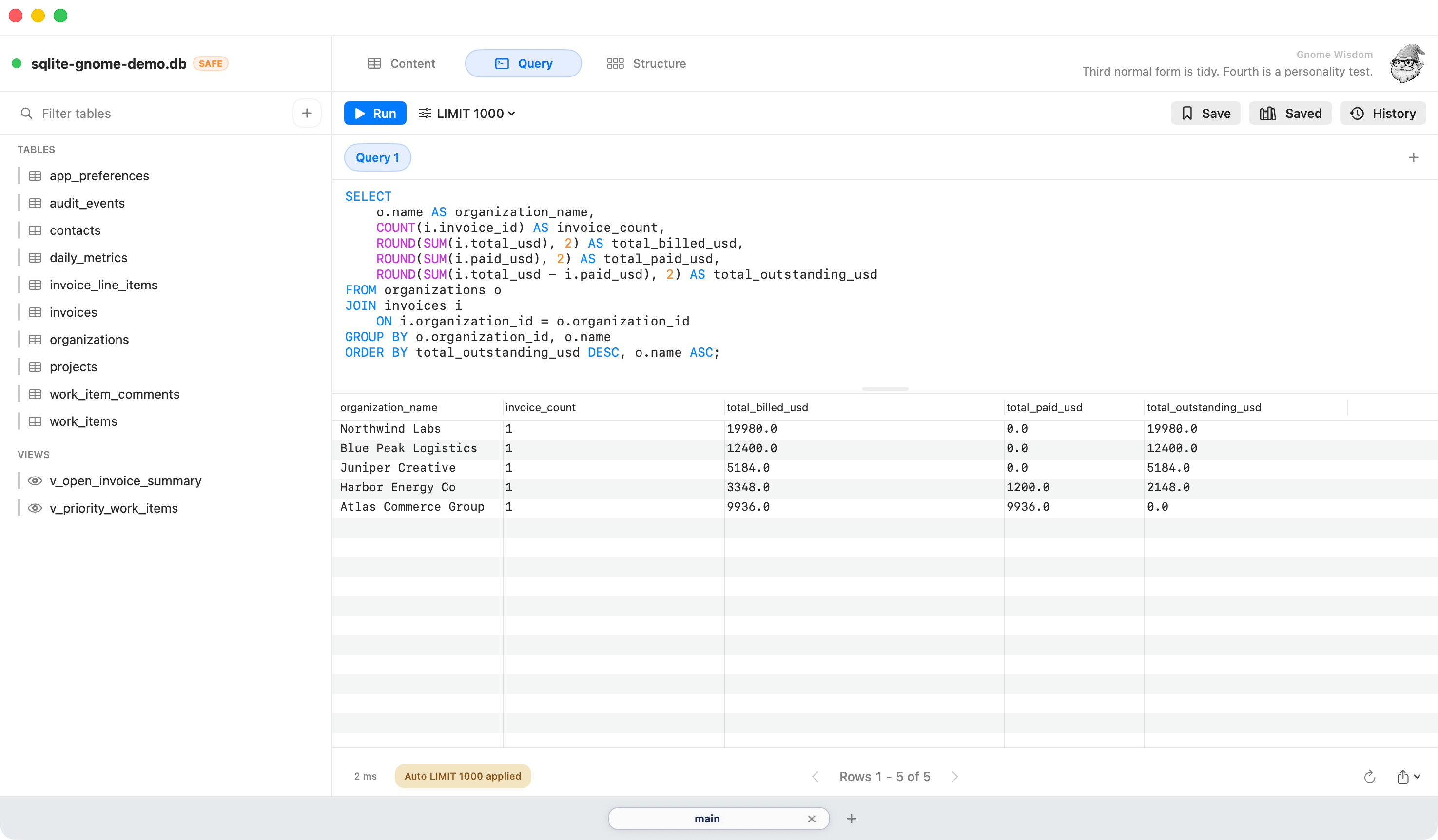
Query Editor
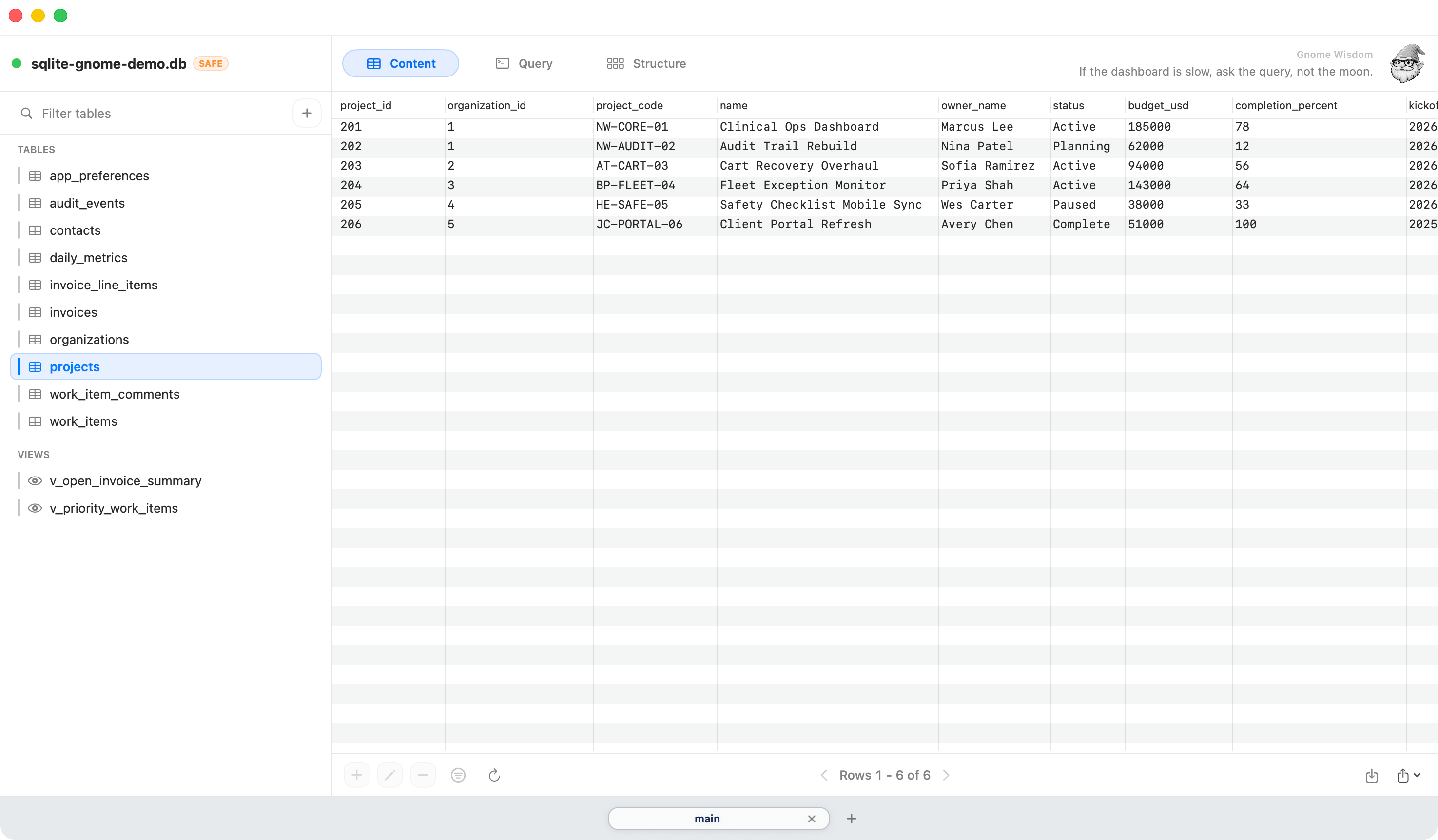
Table Data View
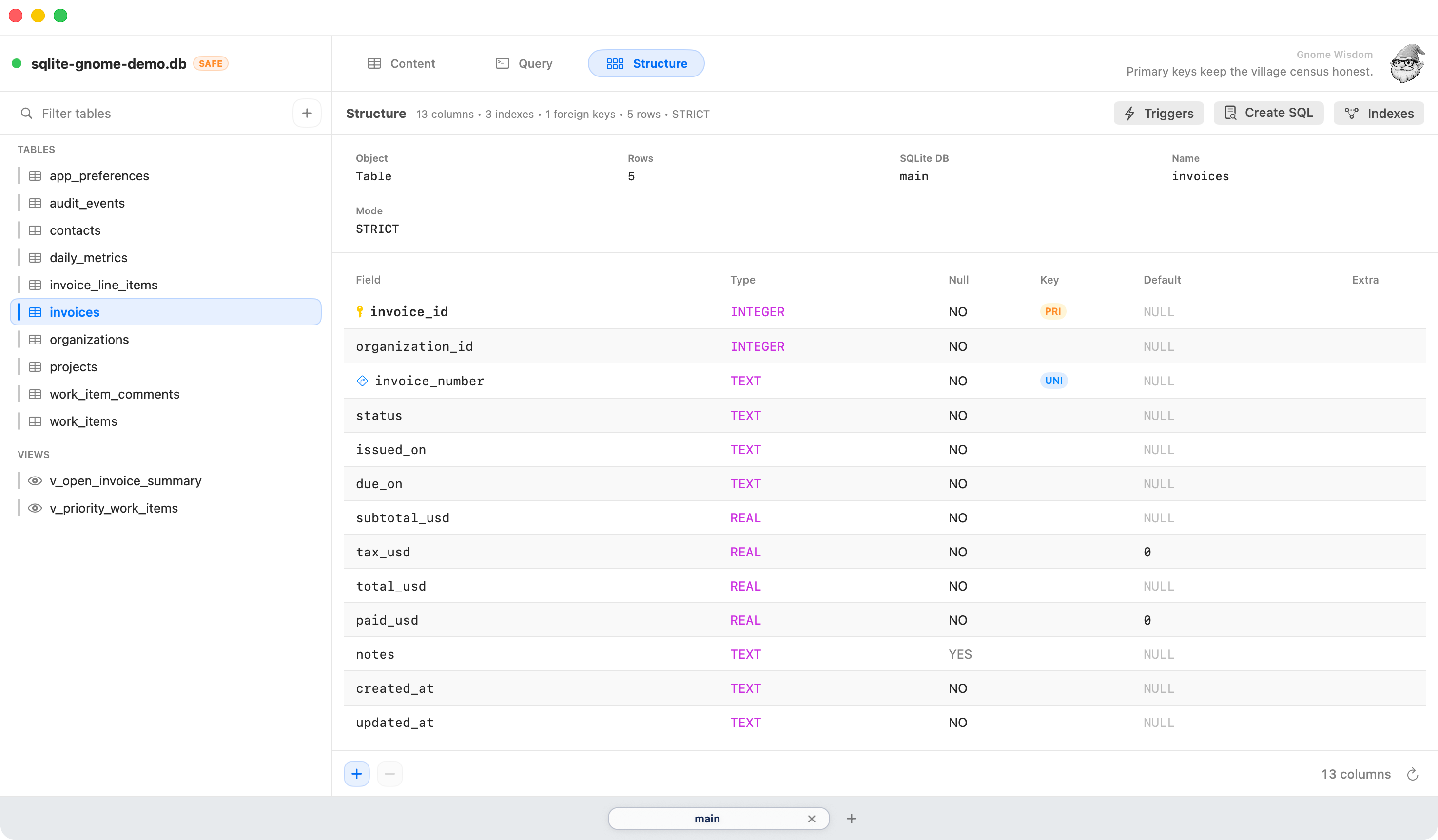
Table Structure
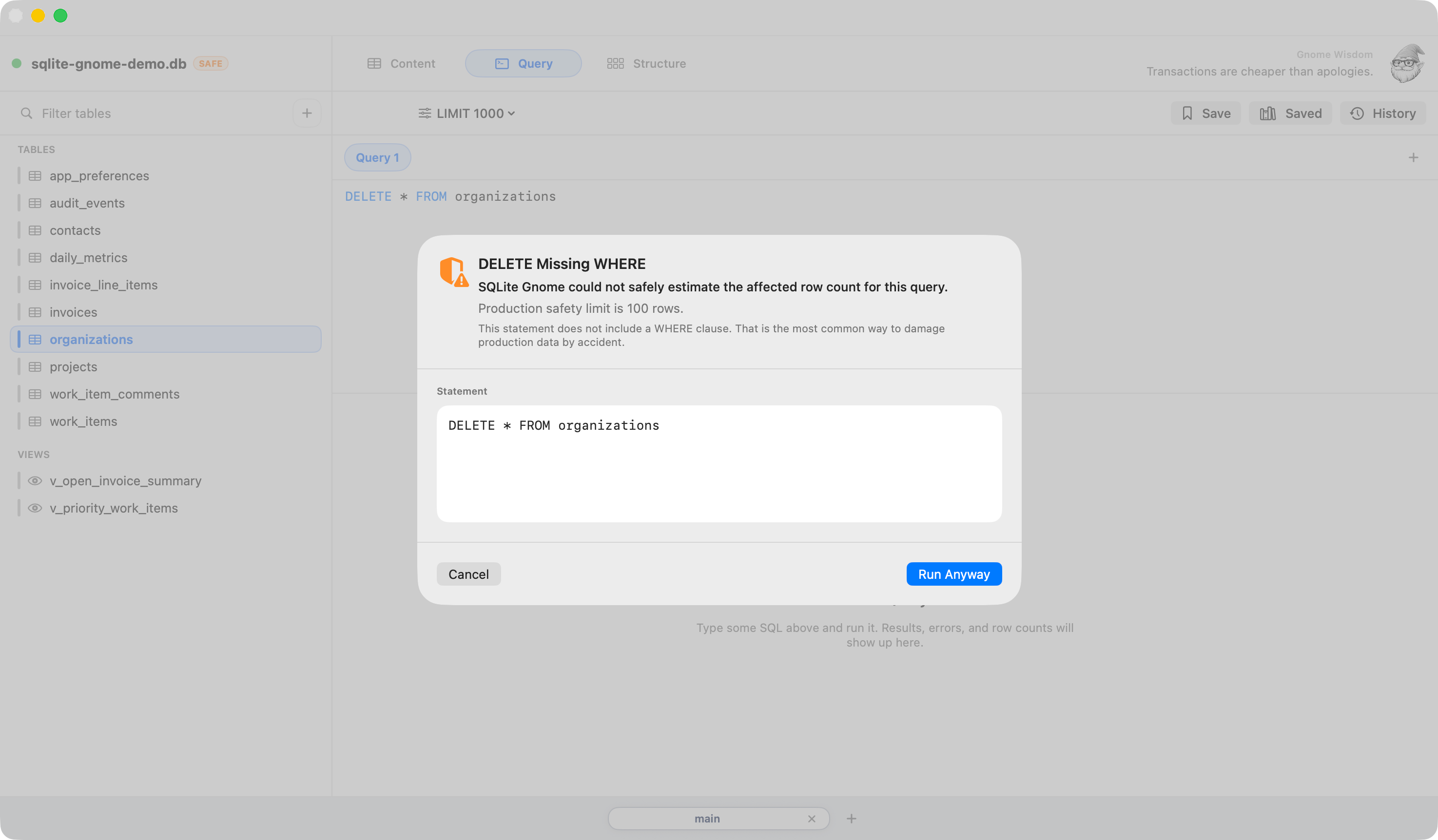
Safety Guardrails
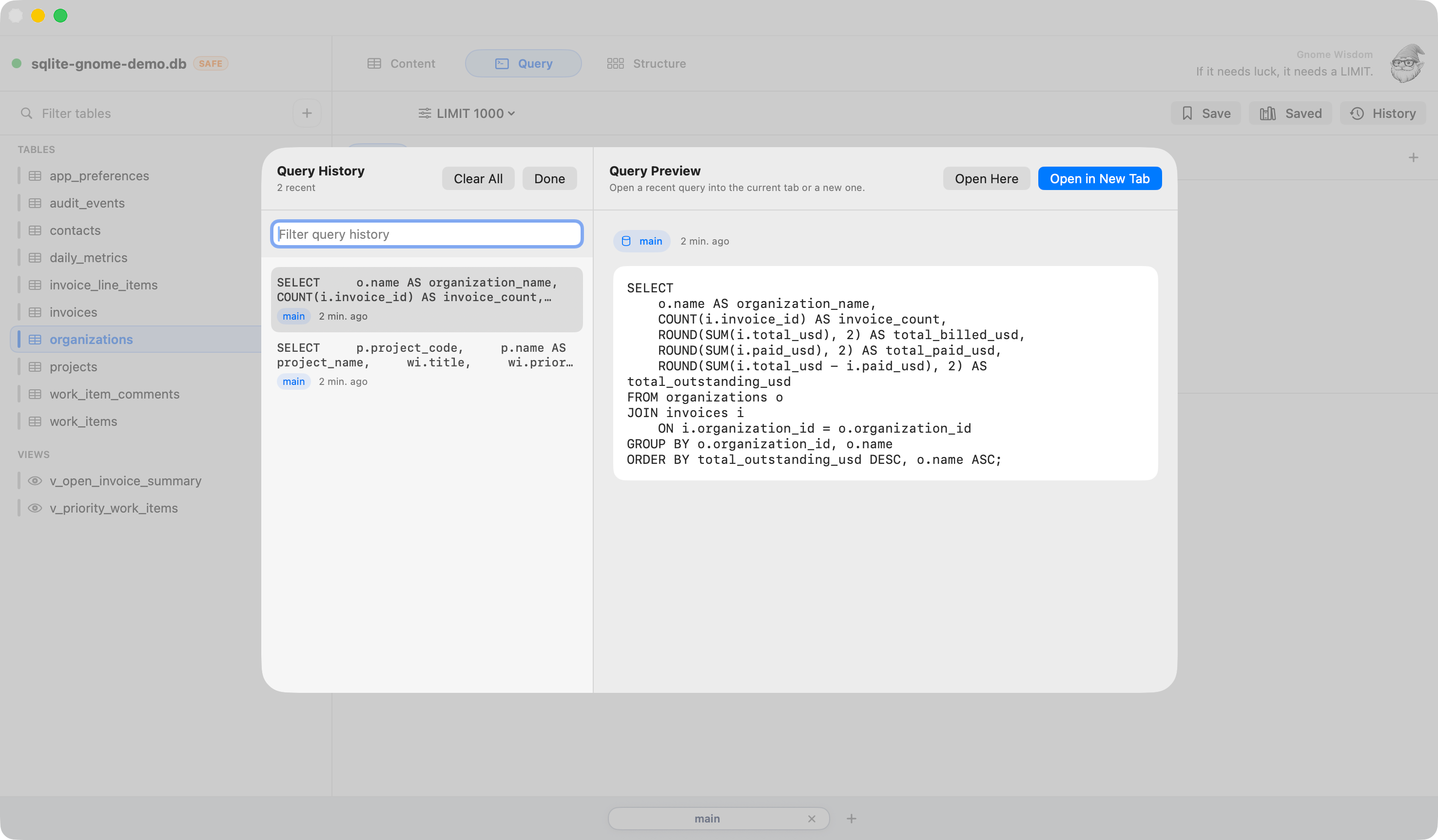
Query History

Run Queries Without Friction

Write and run SQL with immediate feedback — results appear instantly so you can iterate without slowing down.

See Your Data Clearly

Browse rows in a clean, spreadsheet-style view with paging, sorting, and a real filter builder.

Understand Your Schema Fast

View columns, types, indexes, and foreign keys in one place — including SQLite-specific metadata like STRICT and WITHOUT ROWID.

Don't Break Your Data

Destructive queries get a preflight check. Automatic backups before risky writes. Open files read-only when you need the extra safety net.

Pick Up Where You Left Off

Quickly search, preview, and reopen recent queries — your workflow, remembered.

How we stack up

SQLite Gnome vs the rest

Shopping around? We put together honest, side-by-side breakdowns against the most popular alternatives.

VS
SQLiteFlow
Both native macOS SQLite clients. But SQLiteFlow charges monthly. SQLite Gnome charges once.
Native vs Subscription
VS
DB Browser for SQLite
DB Browser is free and widely used. Here's an honest look at what $29 actually gets you on top of that.
Free vs Paid
VS
TablePlus
Both native macOS. But TablePlus costs $414 over 3 years on 2 Macs. SQLite Gnome costs $29. Once.
Pricing · Features
VS
DBeaver
DBeaver connects to everything. SQLite Gnome connects to SQLite — natively, on macOS, without the JVM overhead.
Native vs Java
✓ 14-day free trial
🎉 Launch offer
Launch special — 25% off

Use this code at checkout. No expiry — just 100 spots.

GNORMAN25
← click to copy

⚡ Limited to 100 licenses — first come, first served

$29
$22

One-time purchase · macOS 14+ · Free updates

Download SQLite Gnome

macOS 14 Sonoma or later required

Gnorman the SQLite Gnome

Words from
the gnome

Gnorman has opinions about your .db files. Most of them are correct.

A file is not a backup until you've opened it somewhere else.

Foreign keys are off by default. That's a feature and a warning.

VACUUM is cheaper than explaining fragmentation to your boss.

GNORMAN25 copied!